50 years of KIM-1 and me

With any product it is not always easy to establish a ‘day of birth’.
For the 6502 it is the WESCON trade show in San Francisco beginning on September 16, 1975.

For the KIM-1 no introduction event is known. The first publications in magazines about the KIM-1 were in the second quarter of 1976, so press releases and first products must have come from MOS Technology in the first quarter.
Design of the KIM monitor (the ROM in the 6530-002) happened at the same time as development of the TIM monitor (the ROM in the 6530-004) in 1975. The ICs became available end of 1975, see the Hardware manual.

The KIM-1 computer development, with 6530-002 and 6530-003 (the ROM with the audio tap routines), most likely was done in the second half of 1975.

The only real date I can pinpoint is the publication date of the User Manual, January 1976. So I date the ‘birth’ of the KIM-1 computer in January 1976.

I have collected some KIM-1’s over the years. The first KIM-1 in 1978 I bought and sold many over the years. Now I have nine original KIM-1s, from first edition to Rev A, B, D, E , 2x F, 2xG.
The KIM-1 replica by Eduardo Casino (still building, I have original 6530-002 and -003 for it), and a Digitus Sweden clone.
And several reproductions with 6532’s as replacements.


Top row : first edition, Rev A, Rev B, Rev D, Rev E
Middle row: Rev F, REV F, Rev G, Rev G, Digitus
Botton row: Rev D Eduardo Casino, KIM-1 Ralph, KIM-1 Dave Williams, KIM-1 Dave Williams (not shown an unbuilt blue Dave Williams KIM-1).

KIM-1 clones! (Briel MicroKIM, Corsham KIM clone, PAL-1, PAL-2).
Vince Briel was the first to design and sell a KIM-1 clone, the Micro-KIM. Essential was the replacement of the 6530 RRIOT with a 6532 RIOT and an external ROM. The idea came from Ruud Baltissen. The PAL-1 and PAL-2 are still available as kit. The design files for the Micro-KIM are on github.

Top row: Briel MicroKIM, Corsham KIM Clone and PAL-2.
Bottom row: PAL-1 , Corsham breadboard

10 PRINT for KIM-1 and AIM 65

Michael Doornbos (of https://imapenguin.com/) posted two “10 PRINT” articles for our beloved small 6502 SBC’s.

The KIM-1 version displays on the seven segment LED displays. The AIM 65 prints it on the thermal printer.

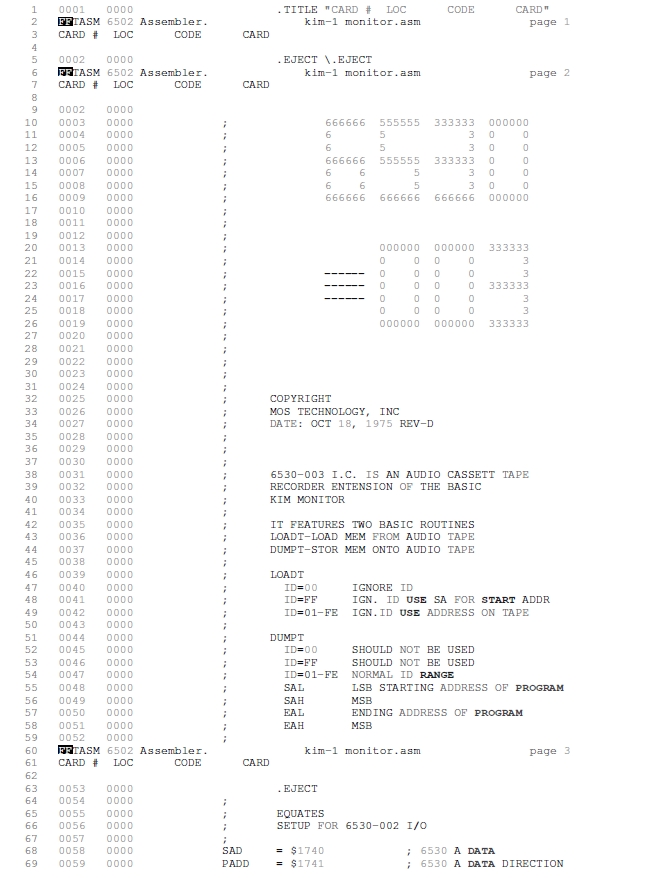
KIM-1 version of 10 PRINT in BASIC and assember

10 PRINT CHR$(47+INT(RND(0)*2)*45);:GOTO 10
; BY MICHAEL DOORNBOS MIKE@IMAPENGUIN.COM; 2025 
; SOFT START AT $0200

; THIS PROGRAM GENERATES A RANDOM PATTERN OF SLASHES AND BACKSLASHES
; AND DISPLAYS IT ON THE KIM-1'S 7-SEGMENT DISPLAY.

; THE PATTERN SCROLLS TO THE LEFT, CREATING A CONTINUOUS EFFECT.

; A LOT OF THIS CODE IS BORROWED FROM:
; https://netzherpes.de/blog/index.php?entry=KIM-1-scrolltext
; kim_msg.asm
; testing lin2c64 6510 assembler
; using J. Butterfield's scan display from Wumpus
; 01/03/2013 ces


; CONSTANTS FOR 7-SEGMENT DISPLAY CHARACTERS
BACKSLASH  .EQU $64        ; BACKSLASH CHARACTER
SLASH      .EQU $52        ; FORWARD SLASH CHARACTER
SPC        .EQU $80        ; SPACE CHARACTER

; KIM-1 HARDWARE ADDRESSES
SAD     .EQU $1740      ; DATA PORT FOR PINS 1-4
SADD    .EQU $1741      ; DATA DIRECTION REGISTER A
SBD     .EQU $1742      ; DATA PORT FOR PINS 5-6
SBDD    .EQU $1743      ; DATA DIRECTION REGISTER B
TIMER2  .EQU $1747      ; OPTIONAL 2ND 6532 TIMER
LOUT    .EQU $7F        ; SET PINS AS OUTPUT TO LEFT 4 LEDS
ROUT    .EQU $1E        ; SET PINS AS OUTPUT TO RIGHT 2 LEDS

; ZERO PAGE VARIABLES
SEED    .EQU $00D0      ; RANDOM SEED LOCATION
TMR     .EQU $00DB      ; TIMER COUNTER
PTR     .EQU $00DC      ; POINTER
XFRHI   .EQU $00DD      ; USED FOR CHARACTER BUFFER HIGH BYTE
XFRLO   .EQU $00DE      ; USED FOR CHARACTER BUFFER LOW BYTE
TMP1    .EQU $00DF      ; TEMPORARY STORAGE
CBUFF   .EQU $00E8      ; CHARACTER BUFFER (6 BYTES)
MSGBUF  .EQU $0180      ; BUFFER FOR GENERATED PATTERNS (30 BYTES)

        .ORG $0200      ; START OF PROGRAM CODE

MAIN    
        ; CLEAR THE MESSAGE BUFFER FIRST TO PREVENT GLITCHES
        LDX #$00
CLRLOOP LDA #SPC        ; USE SPACE CHARACTER TO INITIALIZE
        STA MSGBUF,X
        INX
        CPX #$30        ; CLEAR THE ENTIRE BUFFER AREA
        BNE CLRLOOP
        
        LDA #$00        ; ADD NULL TERMINATOR AT THE END
        STA MSGBUF+23
        
        ; INITIALIZE THE TIMER
        LDA #$FF        ; LOAD MAXIMUM VALUE
        STA TIMER2      ; START TIMER
        
        ; USE TIMER VALUE AS SEED
        LDA TIMER2      ; READ CURRENT TIMER VALUE
        STA SEED        ; USE AS RANDOM SEED
        BNE SEEDOK      ; IF NOT ZERO, IT'S FINE
        INC SEED        ; OTHERWISE INCREMENT TO MAKE NON-ZERO
        
SEEDOK  JSR GENPAT      ; GENERATE INITIAL PATTERN
        
INFINIT LDY #>MSGBUF    ; LOAD BUFFER LOCATION
        LDA #<MSGBUF
        JSR SCAN        ; DISPLAY THE PATTERN
        
        ; GENERATE NEW RANDOM SLASH AT END OF BUFFER
        JSR RANDOM      ; GET RANDOM BIT
        BCC GENBACK     ; BRANCH IF CARRY CLEAR (50% CHANCE)
        
        LDA #SLASH      ; FORWARD SLASH
        JMP STORE
        
GENBACK LDA #BACKSLASH  ; BACKSLASH
        
STORE   STA MSGBUF+22   ; ADD NEW CHARACTER TO END OF BUFFER
        
        ; SHIFT BUFFER LEFT ONE POSITION (SCROLL EFFECT)
        LDX #$00        ; START AT FIRST POSITION
SHIFT   LDA MSGBUF+1,X  ; GET NEXT CHARACTER
        STA MSGBUF,X    ; STORE IN CURRENT POSITION
        INX             ; MOVE TO NEXT POSITION
        CPX #$22        ; CHECK IF WE&#39;RE AT END OF BUFFER
        BNE SHIFT       ; CONTINUE IF NOT AT END
        
        ; ENSURE NULL TERMINATOR IS ALWAYS PRESENT
        LDA #$00
        STA MSGBUF+23
        
        JMP INFINIT     ; LOOP FOREVER

; GENERATE INITIAL PATTERN BUFFER WITH RANDOM SLASHES
GENPAT  LDX #$00        ; START AT FIRST POSITION
GPLOOP  JSR RANDOM      ; GET RANDOM BIT
        BCC GBACK       ; BRANCH IF CARRY CLEAR
        
        LDA #SLASH      ; FORWARD SLASH
        JMP GSTORE
        
GBACK   LDA #BACKSLASH  ; BACKSLASH
        
GSTORE  STA MSGBUF,X    ; STORE IN BUFFER
        INX             ; NEXT POSITION
        CPX #$17        ; CHECK IF BUFFER IS FULL
        BNE GPLOOP      ; CONTINUE IF NOT FULL
        
        LDA #$00        ; ADD NULL TERMINATOR
        STA MSGBUF+23   ; AT END OF BUFFER
        RTS             ; RETURN

; RANDOM NUMBER GENERATOR (8-BIT LFSR)
RANDOM  LDA SEED        ; LOAD CURRENT SEED
        ASL             ; SHIFT LEFT (C GETS HIGH BIT)
        BCC NOEOR       ; SKIP EOR IF BIT 7 WAS 0
        EOR #$B4        ; APPLY FEEDBACK POLYNOMIAL
NOEOR   STA SEED        ; STORE UPDATED SEED
        RTS             ; RETURN WITH CARRY = RANDOM BIT

; SCANNING ROUTINE FROM ORIGINAL CODE
SCAN    STY XFRLO       ; Y AND A GET LOADED BEFORE JSR TO SCAN
        STA XFRHI
        LDA #$07        ; INIT SCAN FORWARD
        STA TMP1
        LDY #$05        ; INIT Y
CONT    LDX #$05        ; INIT X
CHAR    LDA (XFRHI),Y   ; GET CHARACTER
        CMP #$00        ; LAST CHARACTER?
        BNE MORE        ; IF NOT, CONTINUE
        RTS
MORE    STA CBUFF,X     ; STORE CHAR
        DEY             ; SET UP NEXT CHAR
        DEX             ; SET UP NEXT STORE LOC
        BPL CHAR        ; LOOP IF NOT 6TH CHAR
        CLD             ; BINARY MODE
        CLC             ; PREPARE TO ADD (CLEAR CARRY FLAG)
        TYA             ; GET CHAR POINTER
        ADC TMP1        ; UPDATE FOR 6 NEW CHARACTERS
        STA PTR         ; SAVE NEW POINTER
        JSR DSPDLY      ; DELAY DISPLAY
        LDY PTR         ; RESTORE POINTER
        JMP CONT        ; CONTINUE WITH REST OF MESSAGE

DSPDLY  LDX #$0A        ; SET THE DELAY RATE HERE
        STX TMR         ; PUT IN DECR. LOCATION
TIME    LDA #$52        ; LOAD TIMER
        STA TIMER2      ; START TIMER
LITE    JSR DISP        ; GOSUB DISPLAY RTN
        BIT TIMER2      ; TIMER DONE?
        BPL LITE        ; IF NOT, LOOP
        DEC TMR         ; DECREMENT TIMER COUNTER
        BNE TIME        ; NOT FINISHED
        RTS             ; NOW GET 6 NEW CHARACTERS

DISP    LDA #LOUT       ; CHANGE LEFT LED SEGMENTS
        STA SADD        ; TO OUTPUTS
        LDY #$00        ; INIT RECALL INDEX
        LDX #$09        ; INIT DIGIT NUMBER
SIX     LDA CBUFF,Y     ; GET CHARACTER
        STY $00FC       ; SAVE Y FOR MONITOR DISP ROUTINE
        JSR $1F4E       ; MONITOR ROUTINE - DISP CHAR, DELAY 500 CYCLES
        INY             ; SET UP FOR NEXT CHAR
        CPY #$06        ; 6 CHAR DISPLAYED?
        BCC SIX         ; NO
        RTS

AIM 65 version in BASIC

10 PRINTCHR$(47+(INT(RND(1)*2)*45));:GOTO 10

that print random ‘/’ or ‘\’

Replica of the MTU K‑1002 audio card and software by Eduardo Casino

A faithful replica of the K‑1002 8‑bit audio Digital‑to‑Analog Converter card and software for the KIM‑1, SYM‑1, and AIM‑65 computers, originally designed by MTU in the late ’70s.
All details, hardware and software, are available from this repository.

KIM UNO page updated

The KIM UNO, the little cheap KIM-1 hardware emulator needed some information added. Photos, links, text.

Like the recently acquired KIM UNO from retro4004bits, alternative firmware by Willem Aandewiel for better LED display and Keypad control.

Read it here.

Transform a Commodore 1541 into a KIM-1

By replacing the ROM(s) of a Commodore 1541 disk drive it can be made in a KIM-1.

Well, it runs the KIM-1 ROM modified to use the 6522 driving the IEC bus as TTY serial input/output.
The ROM is also moved to E000 for obvious reasons (the 1541 is unchanged!).

Only serial TTY, no LED, no keypad (code removed), no application or expansion connector.
Tiny basic in the other 1541 ROM socket also runs.

But it behaves like a KIM-1, as Dave McMurtrie shows in the video!

This is a first step to a KIM-1 with a 6522 instead of the 6530 or 6532.

Code here in Dave’s github.


(drawing by netzherpes)

RIOT 6530-005 mystery solved!

The MCS6530-005 was known to me only by some lines in MOS pricelist and a remark in an OSI appnote as a 6530 without ROM.
It is therefore no RRIOT but a RIOT (RAM I/O Timer).
I have acquired several MCS6530-005 ICs and tested with the Backbit Pro Chiptester V2 and indeed it passes all tests of the 6530 except the ROM test.

Today I received a scan of a MOS Technology sheet with the chip equations of the MCS6530-044 and MCS6530-005 (thanks Scott Barnes!).
No CS1 and CS2, just I/O PB5 and PB6.

Now the mystery of the-005 is solved! See all 6530 information here.

KIM-1 Simulator can now be used with serial terminals

And now the KIM-1 Simulator can also use a serial terminal, external or a terminal emulator such as Teraterm, Minicon, Putty etc on the same PC with a null modem eliminator.

Jolt/SuperJolt/TIM Simulator now has serial input/output

The TIM Simulator comes with a ‘console’, a glass teletype 24×80 screen. It has a subset of ANSI/VT100 support.Jolt/SuperJolt/TIM Simulator now has serial input/output!

Of course there are much better terminal emulators, like Teraterm, Putty, Coolterm, Minicom etcetera.
And a real VT100 type device is really fun! Or a real Teletype …

A local terminal emulator on the same PC can also be used, with a virtual null modem like, com0com on Windows, socat on Linux


Windows with com0com and teraterm

Raspberry Pi with Coolterm

Jolt pages extended

The Jolt by Micro Associates, Inc, is one of the first 6502 systems. A small SBC with a 6502, 6821 PIA and the RRIOT 6530-004 also known as TIM. 512 byte RAM, a serial Teletype and RS-232 interface. The DEMON software (also known as TIM) is the 1K operating system.
Expansion cards were available, such a 2x PIA card, 2K EPROM card with 1702, Power Supply and a 4K RAM card with 2111 SRAM ICs.

As application software Tiny basic and the Resident Assembler Program RAP are available.

More about the Jolt, Micro associates and Superjolt at the Jolt and Superjolt pages

AIM 65 other hardware page added

For the AIM 65 it was not only Rockwell that produced hardware like video,serial and FDC cards, others also amde hardware for the AIM 65.

I have a page devoted to AIM 65 hardware with new photos, updated and cleaned up documents:

– Comelta S.A. Spain RAM and ROM cards
– Cubit
– Rhines and CRT2 Video
– MTU Micro Technology Unlimited expansions for the AIM 65

And some modern expansions:
SM Baker remakes of video and FDC and bus cards.