
A page on suppressing the KIM-1 echo of TTY input, read non-blocking and make the TTY input deaf.
Problems with the KIM-1 TTY character input
- The KIM-1 hardware is hardware echoing incoming serial characters to the output, no echo in software involved, so you cannot influence what appears on screen. Very annoying!
- The KIM-1 GETCH routine is blocking, no way to check for a character coming in, like a Break. waiting.
Also quite annoying if porting other software to the KIM-1 or you want the program interruptable. - While a program is running something CPU intensive and you type something the program is not really waiting for, the characters appear on screen. Because the KIM-1 does hardware echoing of TTY input, this is unavoidable it seems
Here I present solutions for these problems in software, made possible by the genius hardware design of the KIM-1 TTY I/O.
Are they perfect? Maybe not, it is still bitbanging the incoming serial signal. It can miss the correct starting point for the incoming character bit stream.
If you want a perfect solution, you will need interrupt driven ringbuffered serial I/O with a dedicated IC like the 6850, 6551 etc.
Without this extra hardware you can achieve acceptable results with these routines.
Background in (updated) original article KIM Kenner 17 page 14, Dutch, Hans Otten, 1980
In the KIM Kenner 1 Siep de Vries, founder of the Dutch KIM Club mentioned how in Focal-65 for the 6502 a trick was built in to suppress the hardware echo by manipulating the TTY out bit PB0. I took the idea and implemented it on my KIM-1 in 1980 without seeing the Focal code, as I did not have a Focal binary yet then!
I examined in 2003 how it was done, from the Focal disassembly I made then:
34AF  E6 76       L34AF INC $76         ; random number?
34B1  2C 40 17          BIT H1740       ; check if character is incoming
34B4  30 F9             BMI H34AF       ;=> wait until startbit
34B6  AD 42 17          LDA H1742
34B9  29 FE             AND #$FE        ; clear PA7
34BB  8D 42 17          STA H1742
34BE  20 5A 1E          JSR H1E5A       ; KIM-1 input
34C1  48                PHA
34C2  AD 42 17          LDA H1742
34C5  29 FE             AND #$FE        ; isolate PA7
34C7  09 01             ORA #$01        ; set PA7 to 1
34C9  8D 42 17          STA H1742
34CC  68                PLA
34CD  18                CLC
34CE  60                RTS
How to suppress the hardware echo to TTY out or making the TTY input deaf
The hardware echo of incoming serial signal to outgoing TTY output is shown in the next figures (from the KIM user manual and the KIM Circuit poster).
The TTY KEYBD signal goes via a transistor and NAND gate U15 to PA7 port of the 6532. That signal also goes to pin 10 input of NAND gate U26 which is the TTY out line. This is the hardware echo. When the KIM-1 sends out a character it comes from PB0 to pin 9 of of NAND gate U26 and so comes out to the TTY Out line.
PB5 (audio TTY control) is connected via an inverter to NAND gate U15. The other input is TTY IN. Making PB5 high will make the TTY input PA7 deaf for incoming signals.
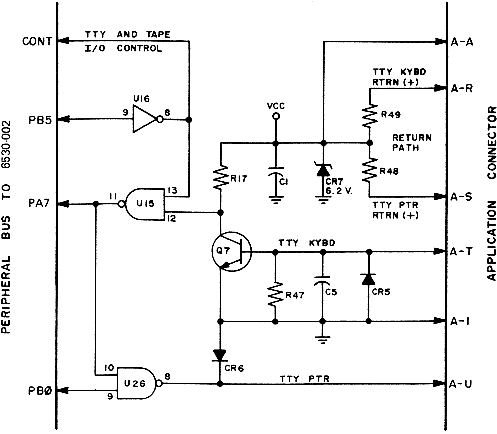
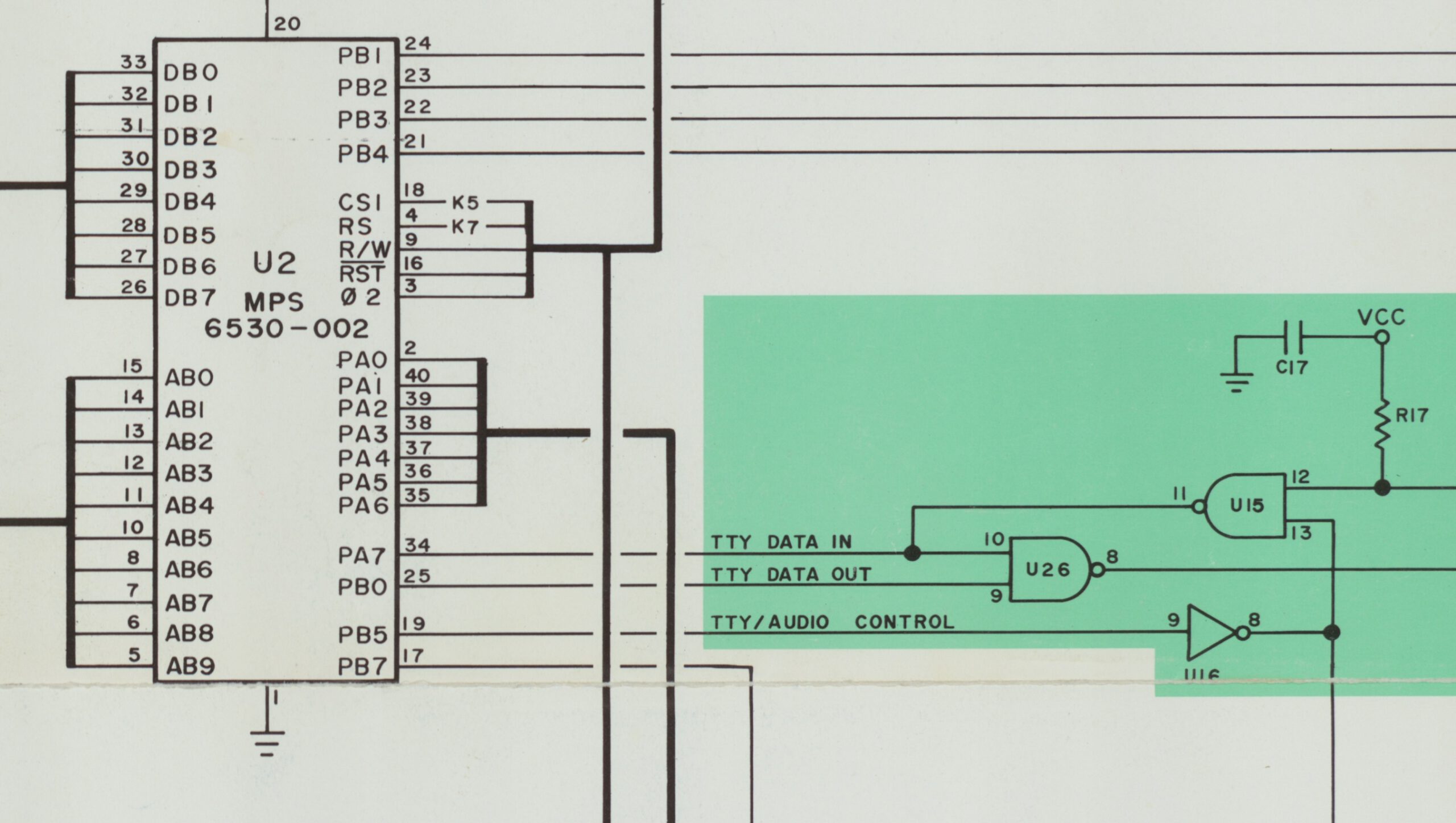
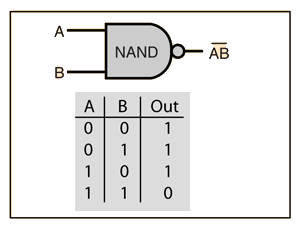
The genius designers of the KIM-1 used NAND gates in the TTY I/O!
Non-blocking input
The KIM-1 GETCH routine detects an incoming character by looking in a loop for the start bit to appear. It then reads the character.
By first doing that loop of looking for the start bit and returning if not yet, then we have the check for a key pressed and a character coming in.
If a character is incoming we have to call as fast as possible the GETCH routine.
;
; KEYPRESS
;   check character coming on character non-blocking
;   - carry set if char coming in
;   - follow up with GETCH or EGETCH as fast as possible if you want echo or no echo
;
KEYPRS  LDA  SAD
        BMI  NOKEY      ; If bit 7 is set, the line is idle, no char
        SEC
        RTS             ; Carry set if key pressed, A is key
NOKEY   CLC
        RTS             ; carry clear, no key
As argued above, this is not foolproof. It is easy to miss an incoming character, as there is no buffering of the input.
Echo suppress
The solution to suppress the echo is making output PB0 low. The NAND gate out will now stay high, ignoring any changes on the other input, the incoming serial character. So nothing is echoed.
In this routine the standard KIM-1 GETCH routine at $1E5A is encapsulated in a subroutine that prevents the echo by setting PB0. Note that this is not a complete block of the echo, it is only active when the program calls the blocking EGETCHAR. The calling program is now responsible for the echoing or otherwise.
;
; EGETCH from TTY without echo (Y returned FF due to GETCH)
;
EGETCH  LDA  SBD
        AND  #$FE       ; Set PB0 to U26 low to suppress the echo
        STA  SBD
        JSR  GETCH
        PHA
        LDA  SBD
        ORA  #$01       ; Set PB0 to U26 high to enable the echo
        STA  SBD
        PLA
        RTS
To make the TTY input really deaf you can use PB5. Calling the deaf routine hardware blocks any incoming TTY signal.
;
; TTYDEAF
;   call this to block any incoming character
;
TTYDEAF LDA  SBD
        ORA  #$20       ; Set PB5 to U26 high to block input
        STA  SBD
        RTS
;
; TTYHEAR
;   call this to restore incoming character via GETCH or EGETCH
;
TTYHEAR LDA  SBD
        AND  #$DF       ; Set PB5 to U26 low to allow input
        STA  SBD
        RTS
Using TTYdeaf/hear in combination with KEYPRS and EGETCH works quite well to prevent most unwanted screen display of characters.
Example program of suppressing echo and non-blocking
I wrote a litle program demonstarting the non-blocking and no echo facilities presented here.
Download sources, binary, papertape here.
This is the console output of the program:
KIM
0000 0200
0200 A2 G

Demo of echo suppress and non-blocking input Hans Otten, 2026

Normal get character, until ESCAPE
 1 31 2 32 3 33 4 34 5 35 6 36  03 1B
NOECHO get character, until ESCAPE
  31  32  33  34  35  36  03  1B

If run on KIM-1 Simulator: set in  Settings Non-blocking or Focal-V3D

Non-blocking no echo until ESCAPE
31
key pressed
32
key pressed
33
key pressed
03
key pressed

Demo of echo suppress and non-blocking input Hans Otten, 2026

KIM
0200 A2 _
If you have a KIM-1, PAL-1, PAL-2 or Micro-KIM, these routines may help you.
The Corsham KIM Clone does not support PB5, and no deaf input on that one. Echo suppress works!
These routines also run on the KIM-1 Simulator. The non-blocking routine requires a Setting in the Simulator.
In versions before 2.3.1 check Focal-V3D, the later versions check Allow non-blocking.
The TTYdeaf routine does not work yet on the Simulator, PB5 is ignored.
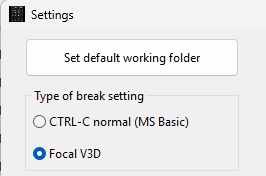
Settings in 2.3.0
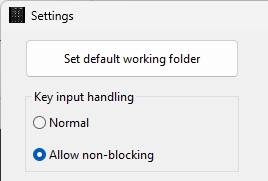
Settings 2.3.1