
TTY Serial
The KIM-1 Simulator comes with a ‘console’, a glass teletype 24×80 screen. It has a subset of ANSI/VT100 support.
Of course there are much better terminal emulators, like Teraterm, Putty, Coolterm, Minicom etcetera.
And a real VT100 type device is really fun! Or a real Teletype …
Now the KIM-1 Simulator can use either an external serial device, e.g a PC with Teraterm or Minicom, or a terminal emulator locally on the same PC.
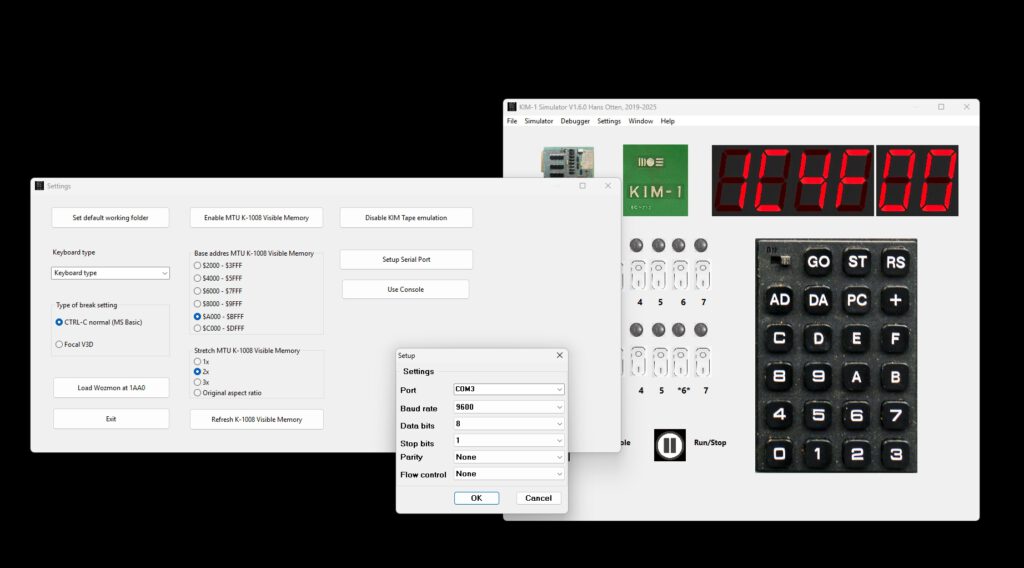
Activate serial input/output local on your PC as follows:
- Start your external terminal emulator, e,g, Teraterm or Minicom with serial port settings 9600 baud.
- Choose the desired serial port, See below for Windows or Linux null modem setup
- Start the KIM-1 Simulator
- Activate TTY Console, the Console window appears
- Choose Settings – Setup serial port
- set for 9600 baud
- Choose the desired serial port, the OTHER in the null modem setup
- Press the Use serial button, the console window disappears
- Start the Simulator from the main Window with Run/Stop
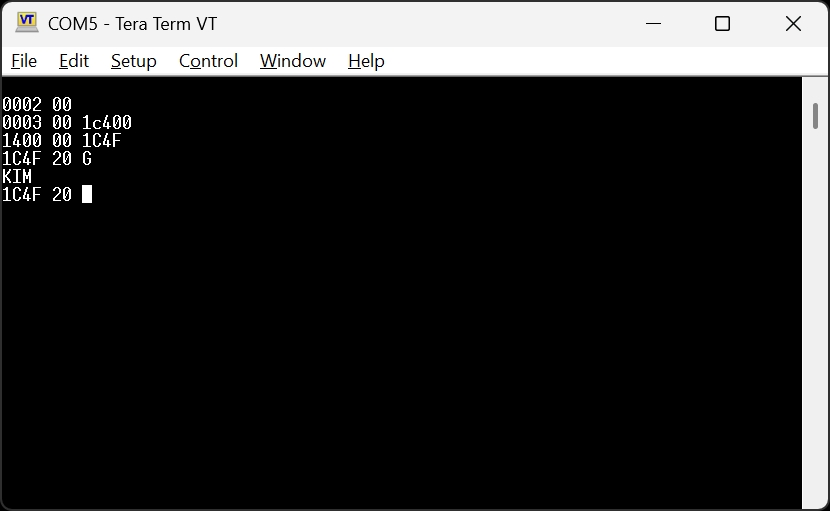
- Now the serial terminal emulator shows the KIM prompt
- Note the Simulator is not very forgiving if you make a mistake with serial ports in this first version, Close the Simulator application and start over.
Windows
Install the com0com null-modem emulator from here.
That delivers two COM ports that act as if they are connected via a null modem, anything entered at one is sent to the other and vice versa.See the device manager for the ports created.
Use a terminal emulator as Teraterm with a serial connection to the other COM port. With the same settings for serial as in the Simulator!
Then select in Settings – Use serial and start the emulator.
Note the KIM-1 only works with uppercase characters.
Linux
Use this commmand (install socat if not present).
socat -d -d pty pty
The code above returns (the pts numbers may be different).
2013/11/01 13:47:27 socat[2506] N PTY is /dev/pts/2
2013/11/01 13:47:27 socat[2506] N PTY is /dev/pts/3
2013/11/01 13:47:27 socat[2506] N starting data transfer loop with FDs [3,3] and [5,5]
Any character entered at one is sent to the other pts device as if a null modem cable is connected.
Use the device /dev/pts/2 in the KIM-1 Simulator Settings – Setup serial. Default is 9600.
Start a terminal emulator like minicom or Coolterm and select device /dev/pts/3 at 9600 baud.
Select in Settings – Use serial port /dev/pts/3 and start the terminal emulator.
Now you can control the TIM via minicom or any suitable VT100 like terminal emulator.
Select in Settings – Use serial and start the emulator
Minicom is easy to use. Just set the terminal serial port (the other than the emulator uses).
Coolterm is tested, but is a little bit troublesome to configure.
Force the serial port via Custom and ignore the warning messages.