
The second RRIOT, named 6530-003, in the KIM-1 is nearly free to use by the user. The two parallel ports, the timer, the RAM, not used by the software.
But the ROM is used, it contains two routines to dump and load data on audio cassette tape. The hardware for this is connected to the 6530-002.
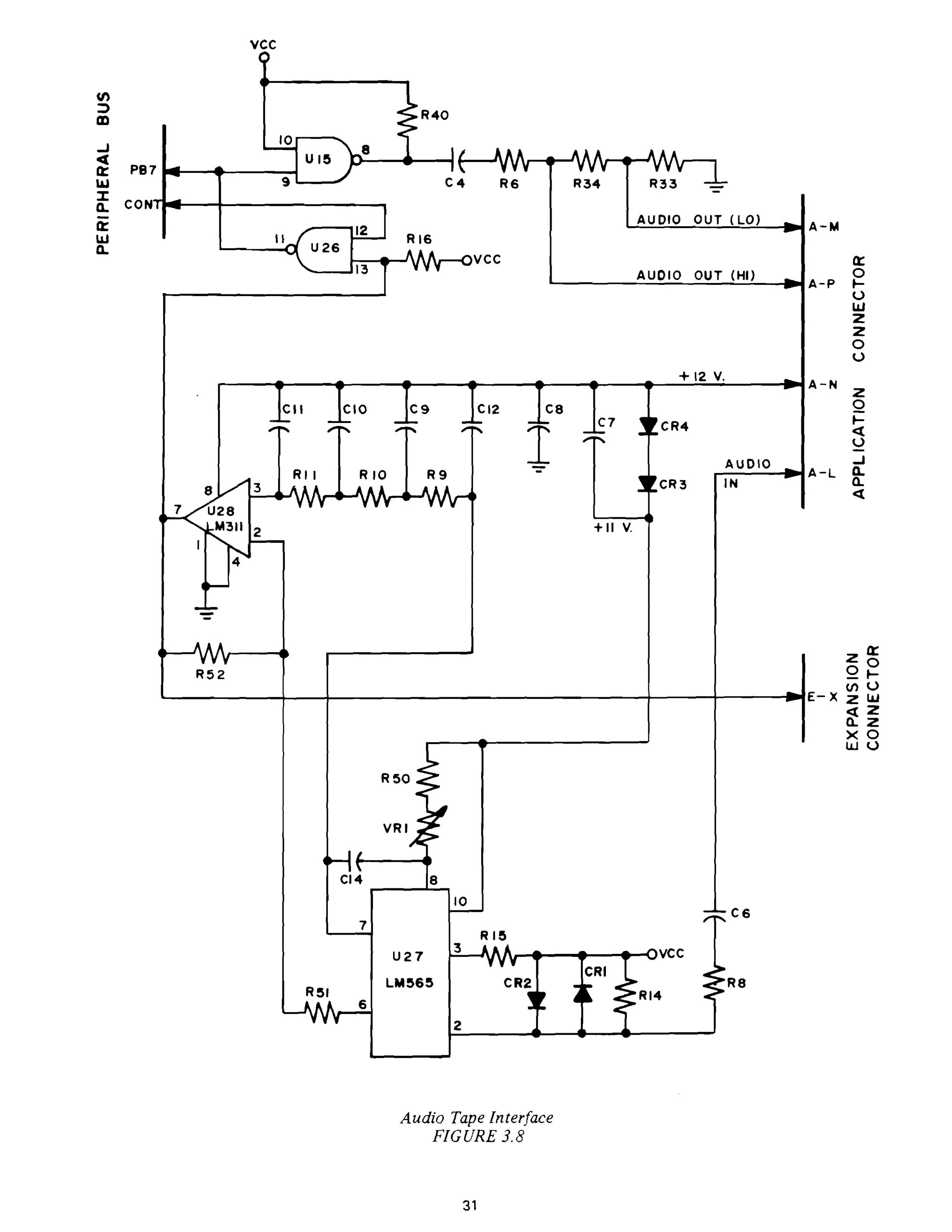
The hardware for audio out is simple, the software does all the work of producing audio tones at PB7, with some pulse shaping with a capacitor/resistor and a ‘low’
or ‘high’ amplitude output.
Audio in is a bit more complicated. The PLL LM565 Phase Locked Loop detects the frequency of incoming audio signals, the output of the PLL is converted to TTL level by the comparator LM311. This is is the only part of the KIM-1 hardware requiring 12V.
See here the datasheet of the LM565.
On pin7 a TTL signal is seen if there is a KIM-1 compatible audio signal is coming in.
Read Appendix E of the User manual to see how all this works.
The two routines, LOADT and DUMPT, are described on the next pages. The style of the programming is a different from the main ROM. It is better structured and easily readable.
Where the 6530-002 papertape routines use indexed zeropage addressing to load/save bytes in memory, the 6530-003 uses a so called Volatile Execution Block VEB in page 23.
A small routine is constructed there during the dump and load.
For DUMPT
AD yy xx 60 LDA xxyy RTS
for LOADT
8D yy xx 4C TAP STA xxyy XX JMP LOADT12
The address xxyy is incremented during the load or dump.
DUMPT and LOADT are completely independent of the monitor in the KIM 6530-002. So you have to start the routines via the GO command or key. The routines end with a call to START in the main routine, where an error condition is indicated with the current address: 0000 is succes, FFFF is error.
It would have been nice to integrate DUMPT and LOADT with command in the TTY loop for example and return via the normal exit routine, displaying ERR KIM as the papertape routines do.
Also making it callable as subroutine might have nice for programs like the KB9 MOS Technology Basic for the KIM or Focal instead of falling back to the KIM monitor.