
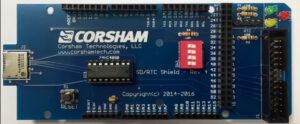
The SD-Shield is a mass storage device designed by Bob Applegate for Corsham Technologies. He named it SD/RTC Card. Based upon an Arduino Shield, an SD card interface and RTC are made available to a computer like KIM-1 or 6800 based machines.
Bob developed supporting KIM-1 software called xKIM, as loadable on a standard KIM-1 or integrated in the KIM Clones and Memory expansions.
Corsham is no more, but you can still build one yourself by visiting Eduardo Casino’s remake or buy one ready made with a Pico at RetroSpy Technologies.
Eduardo also made a PAL-II adapter for the SD Card Shield.
The main functions of the SD Shield are to allow programs access to files on the SD card and get/set the time on the Real Time Clock.
The interface to the SD Card is described in the Remote Disk Protocol Guide..
The SD card Shield and the KIM-1 Simulator
The SD Card shield is emulated in the KIM-1 Simulator since version 2. It uses the second RRIOT PIA ports, so the LEDs and switched on the main windows are disabled when in use.
The emulator makes the SD card available as a folder on the disk of the computer, from now on called SDCARD folder. You can place any file there of interest there.
The contents of SDCARD in the KIM-1 distribution are
bootsdshield-kimrom.bin
bootsdshield.bin
bootsdshield.pap
CPM-BOOT.DSK
kb9.ihex
newimage.dsk
SD.cfg
xKIM.ihex
To start using the SD Card/RTC Shield go to the menu settings.
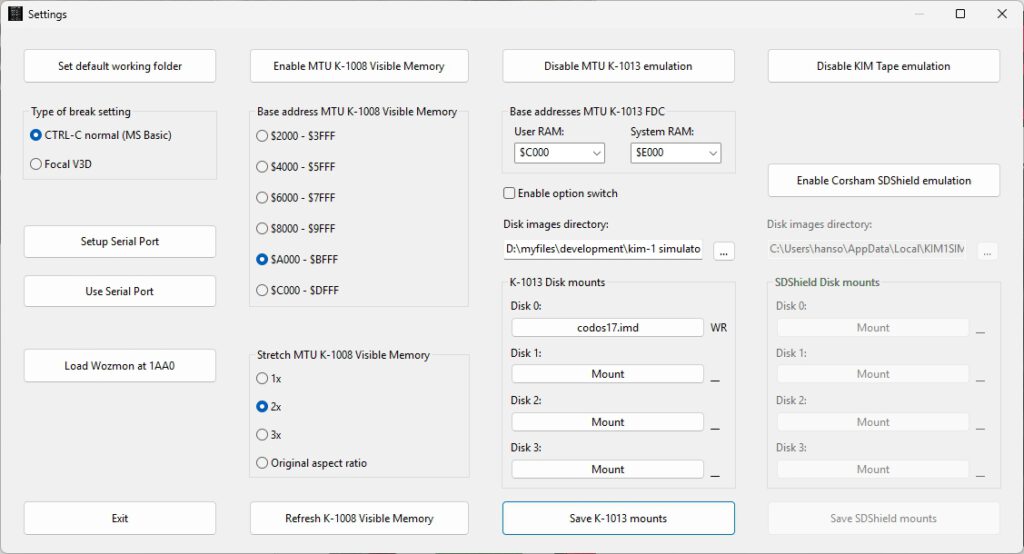
- Enable Corsham SDShield emulation
- Copy the folder from the KIM-1 Simulator setup distribution archive called SDCARD to your disk.
- Choose the Disk images directory pointing to the folder SDCARD. You will see the files on Disk 0 etc filled in, DSK files are for operating systems like CP-M/65. See below.
- Put the KIM-1 in TTY mode on the main window and start the emulator. The usual KIM prompt will appear and you are in the KIM-1 monitor.
Now you either start xKIM or CP/M-65.